

Certify Plus

Every step of certification, in order

Certify Plus follows the way a certification body really works. Each step opens the next, and nothing is lost between them.

The certification steps in Certify Plus

app.certify-plus.com

Certify Plus

Certificate NoCustomerISO StandardCertificate Status
NG-EOMS-26-010405/10/2026Lumenhill Education InstituteISO 21001Active
NG-ISMS-25-010307/06/2026Quillbyte Software SolutionsISO/IEC 27001Active
NG-IMS-24-010109/12/2025Brennox Steel Works LLCISO 9001, ISO 14001, ISO 45001Active
NG-FSMS-24-010202/12/2025Tavorin Food Industries LLCISO 22000Active
NG-EMS-22-009820/11/2023Tidemarsh Water TreatmentISO 14001Expired

1-5 of 5

From application to certificate, one step at a time

Each step opens the next, and every document carries your company’s name, logo, colour and document numbers. Built around ISO/IEC 17021-1 practice and the IAF mandatory documents (MD 1, MD 5 and MD 11).

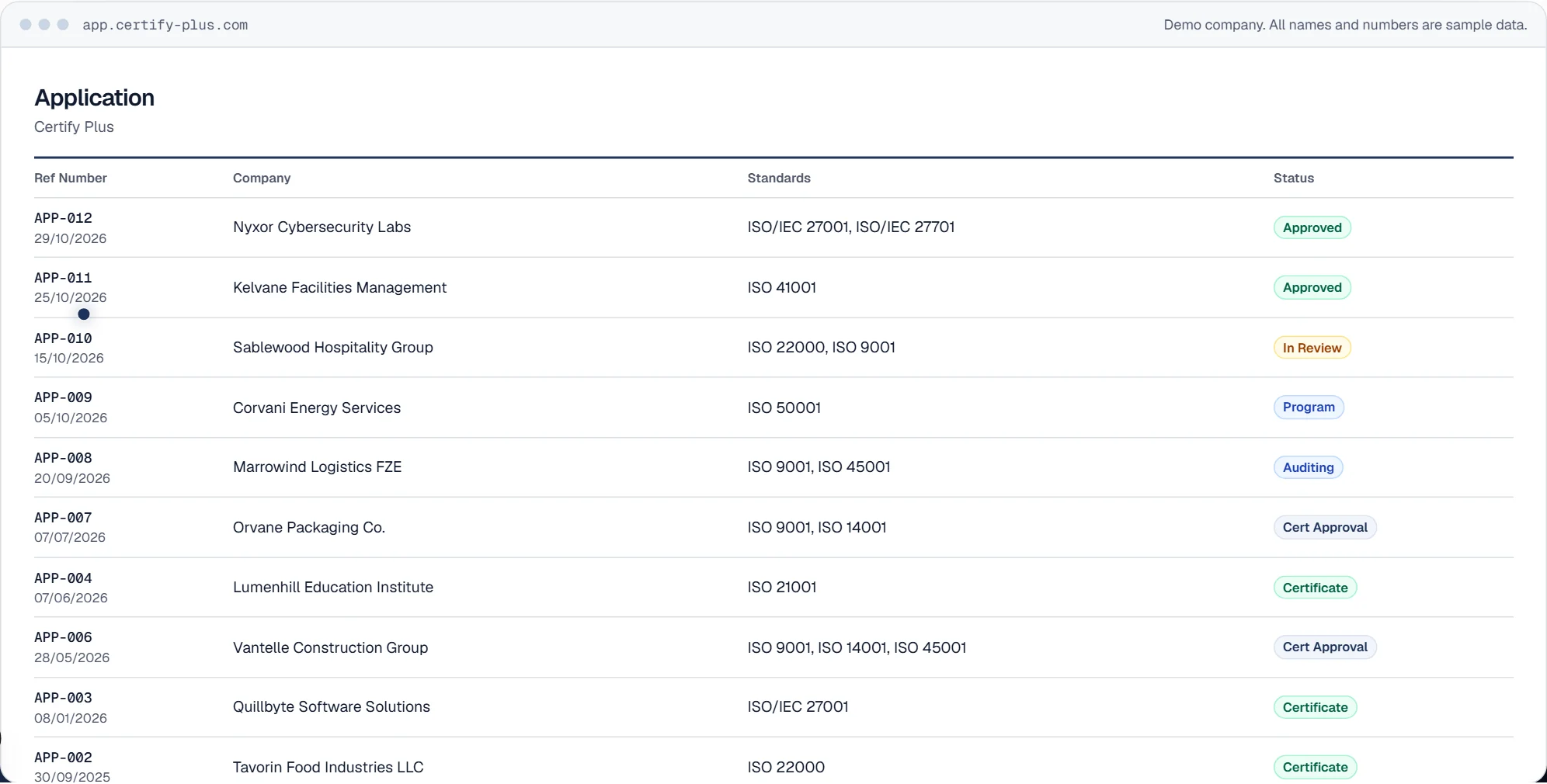
01ApplicationThe client’s certification request, captured in fullAn approved application becomes an Application Review.

Every certification starts with an application. Enter it yourself, or send the client a secure link so they fill it in online, with no account needed. The form covers what a certification body must know before it can quote or plan an audit.

app.certify-plus.com · demo company, sample data
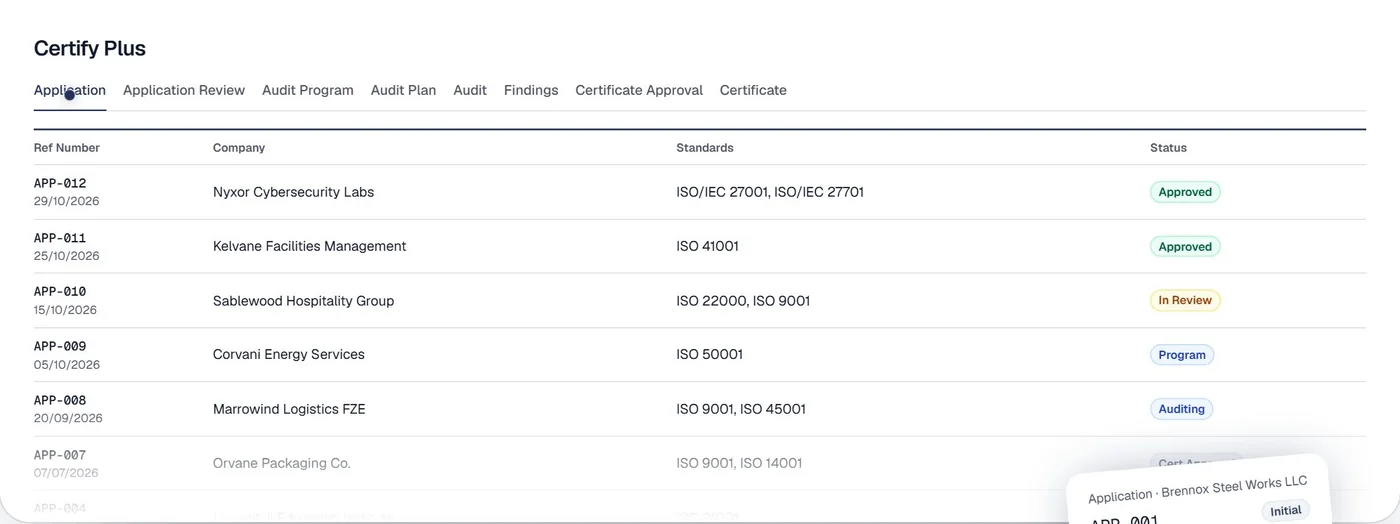
Application in Certify Plus, with sample data

Who uses it: Certification coordinators and account managers. The client fills in their part through the link.

What the application covers

  • Customer and application: a new or existing customer, the type of application (initial, recertification, initial combined audit or transfer), the accreditation or your own certificate, and the standards.
  • Company and contact: legal entity, registration number, website, contact person, address and industry sector.
  • Sites and scope: sites and locations, the activities at each site, a central function, temporary or project sites, the scope the client wants, and their products and services.
  • Processes: core, support and outsourced processes, design and development, and how complex the organisation is.
  • Employees and readiness: permanent, temporary, part-time and contract staff, shifts, the audit language, an interpreter, and when the client will be ready for Stage 1 and Stage 2.
  • Technical questions: environmental aspects, health and safety hazards, hazardous materials, high-risk work, and how far the management systems are integrated.
  • Impartiality and risk: relationships with your auditors or staff, consultancy by a related company, former employees, recent changes and high-risk legal obligations.

What you do

  • Send the client an application link by email. You enter only the company name, the email addresses, the standards, the type and the accreditation, and the client fills in the rest.
  • Or enter the application yourself. Internal notes stay with your team and are never printed on the application.
  • Attach the company registration document.
  • Follow every application: draft, submitted, under review, approved or rejected. Only an approved application moves on.
  • Download the application as a PDF with your name, logo and document number.
  • Choose which emails the client receives for this application. All are off until you turn them on.
02Application ReviewReview the application, work out the audit time, choose the team and decideAn accepted review becomes an Audit Program.

A structured review of the application before anything is promised to the client. It records the decision to accept the client, how much audit time is needed, and who will audit. The review is made in eight parts.

app.certify-plus.com · demo company, sample data
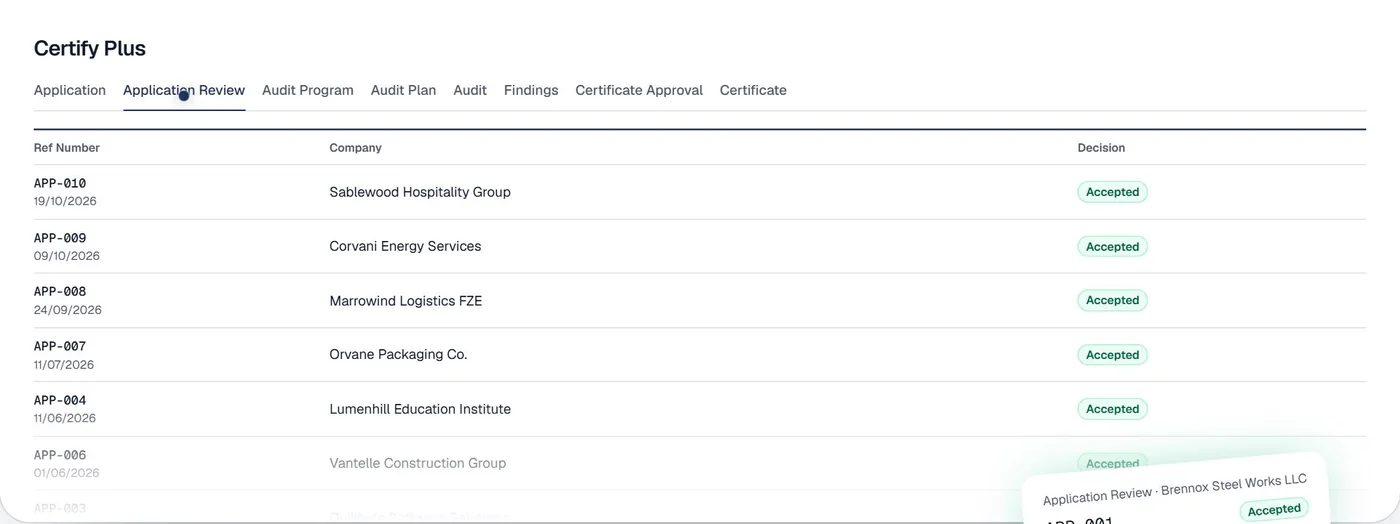
Application Review in Certify Plus, with sample data

Who uses it: Application reviewers, technical managers and certification managers.

The eight parts of the review

  • The application and the review date.
  • The client: IAF code, legal and regulatory requirements, the management system, the scope asked for and the final scope agreed.
  • Verification of impartiality, with a reason if the application is rejected.
  • Availability of resources, and what is happening at the site on the planned audit dates.
  • Effective staff, audit location and activities, the complexity category, and the sampling of temporary or project sites (IAF MD 1).
  • The audit man-day calculator: base man-days, reduction, increase and integration adjustment for every audit of the cycle, with the audit-time factors of IAF MD 5 and the reduction for integrated management systems (IAF MD 11). A further reduction needs a written justification.
  • Selection of the audit team, with a check of each auditor’s impartiality and any relationship with the client.
  • Approval: the decision (accepted, needs information or rejected), with the date and notes.

Rules built in

  • The auditors chosen for the team cannot also be the audit reviewer.
  • The reviewer cannot be the person who created the application.
  • Only an accepted review, for an approved application, can become an Audit Program.

What else you get

  • Contract review questions, answered and kept with the review.
  • A Certification Agreement as a PDF, under your own company name and terms.
  • The Application Review as a PDF.
03Audit ProgramThe whole certification cycle planned in one placeEach audit in the program becomes an Audit Plan.

From an accepted review you create the audit program: the schedule of every audit in the certification cycle, with the auditors, the durations and the fees.

app.certify-plus.com · demo company, sample data
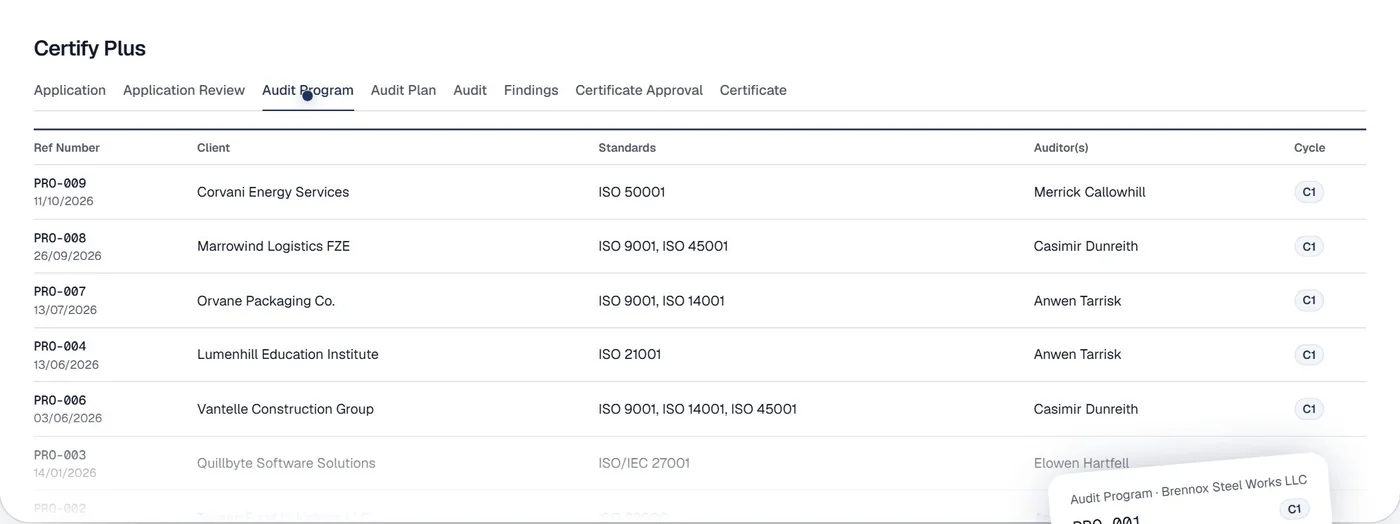
Audit Program in Certify Plus, with sample data

Who uses it: Certification managers and scheduling officers.

What the audit program holds

  • The program number, client, standards, and the start and end of the cycle.
  • Every stage: Stage 1, Stage 2, Surveillance 1, Surveillance 2 and recertification, each with dates, duration, auditors, delivery (on-site, remote or hybrid) and status. You can insert further stages.
  • The total cycle fees, shown only to people allowed to see fees.
  • A coverage matrix of the client’s processes, products and services, and sites, showing in which audit each one is covered.
  • Programme review notes when the client’s processes, sites or scope change.

What you do

  • Create the program from the accepted reviews waiting for one.
  • Add an audit to the auditor’s Team Schedule in one click.
  • Convert any audit in the program into an Audit Plan.
  • See, for each audit, how many plans and reports exist and which are complete.
  • Download the program as a PDF.

Rules built in

  • Once an audit has taken place, its date, type and auditor can no longer be rewritten.
  • Once a certificate is issued, its standards are fixed. A change of scope needs its own application.
  • Editing the program updates what is not yet completed. Completed records keep their history.
04Audit PlanA detailed plan for each audit, with the schedule day by dayA plan becomes an Audit.

A plan for one audit, made from an audit in the program. It tells the client and the audit team what will be audited, when, where and by whom.

app.certify-plus.com · demo company, sample data
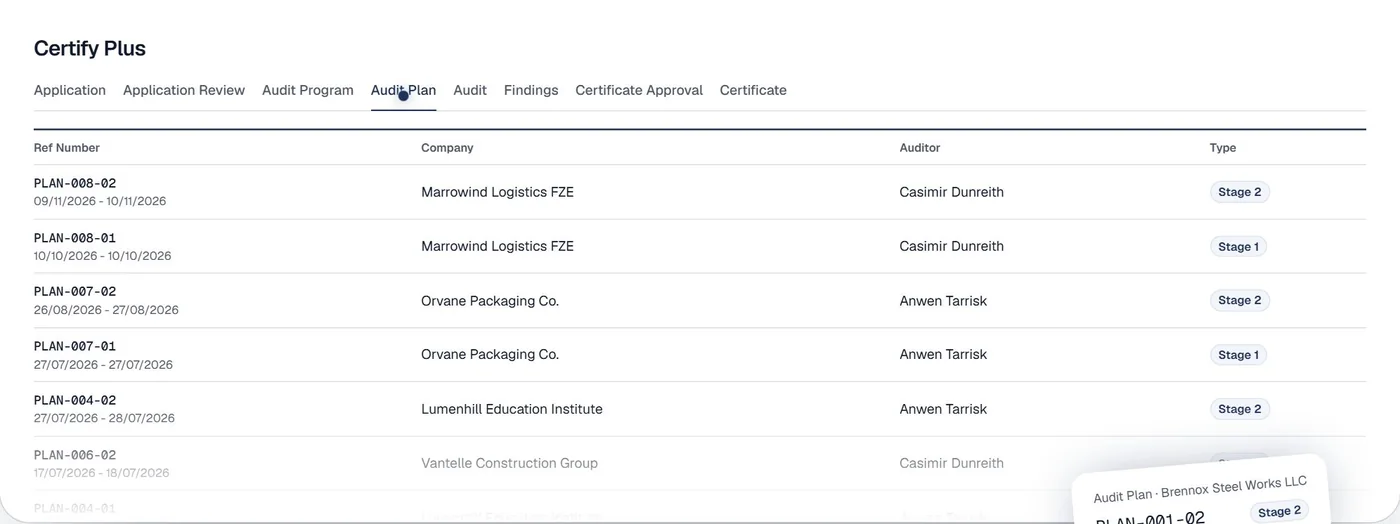
Audit Plan in Certify Plus, with sample data

Who uses it: Lead auditors and scheduling officers.

What the audit plan holds

  • The plan type: Stage 1, Stage 2, Surveillance or Recertification.
  • Company, auditors, audit language, observer or technical expert, scope, standards, criteria and objectives.
  • Dates, duration, working or shift hours, location, any temporary or project site, and delivery: on-site, remote or hybrid.
  • The audit schedule day by day: time, activity, standard, clause, department and auditor. Every cell can be edited.
  • The audit methodology, documents and attachments.

What you do

  • Create the plan from an audit in the program. Plan numbers are made for you.
  • Split an audit across several plans when it covers several standards. The system shows what is already covered.
  • Come back to an unsaved plan: the draft is restored.
  • Approve the plan, download it as a PDF under your name and logo, and email it to the client.
  • See planned audits on a calendar, and convert the plan into an Audit when it takes place.
05AuditThe audit report, reviewed by an independent personNo findings: Certificate Approval. With findings: Findings.

The auditor writes the audit report in the system, from the plan. It is reviewed before it goes anywhere else.

app.certify-plus.com · demo company, sample data
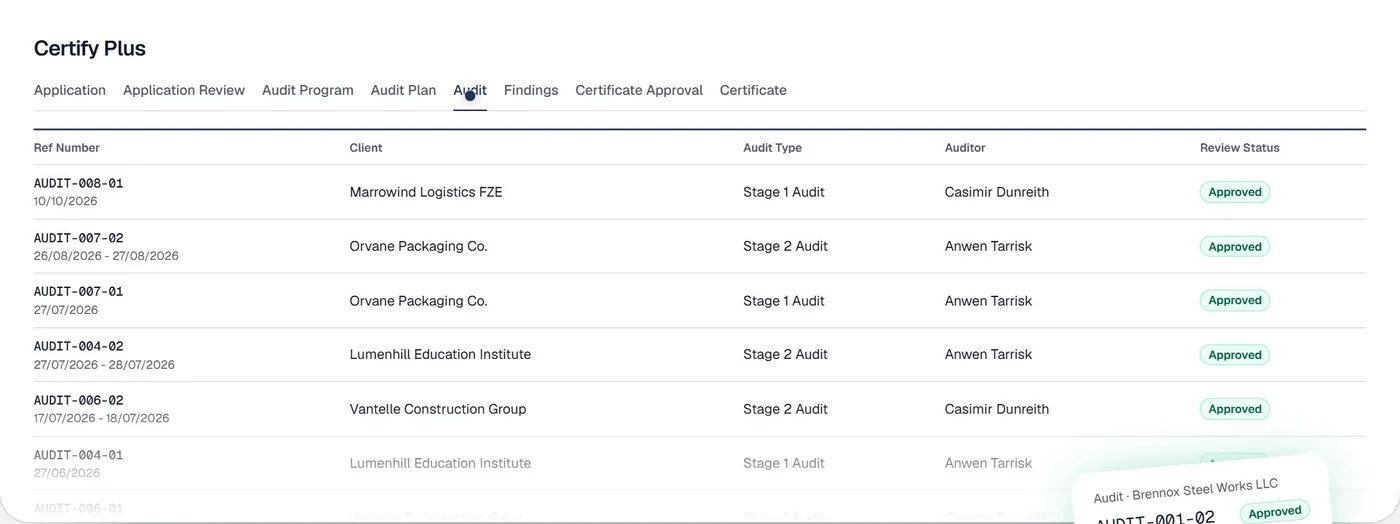
Audit in Certify Plus, with sample data

Who uses it: Auditors and audit reviewers.

What the report holds

  • Company details, auditors, dates, scope, criteria, objectives, legal requirements, and the changes since the last audit.
  • Attendance at the opening and closing meetings, and the assessment team.
  • Auditor notes against each requirement. Mandatory questions must be answered before the report can be submitted.
  • Findings with their clause and description, from a list of finding types you control (by default major nonconformity, minor nonconformity, observation and opportunity for improvement).
  • The auditor’s recommendation for each standard, and an overall summary.

What you do

  • Convert an audit plan into an audit and write the report. Drafts are saved as you go.
  • Submit the report for review. The reviewer approves it, asks for changes or rejects it.
  • Follow every audit: draft, awaiting review, changes required, approved or rejected.
  • Mark the report as sent to the client, and download it as a PDF.

Rules built in

  • The reviewer is chosen independent of the audit’s own auditor whenever another reviewer exists. If the only reviewer is also the auditor, the screen says so.
  • A Stage 1 audit does not issue a certificate: Stage 2 is scheduled to continue.
  • An audit with findings goes to Findings before Certificate Approval.
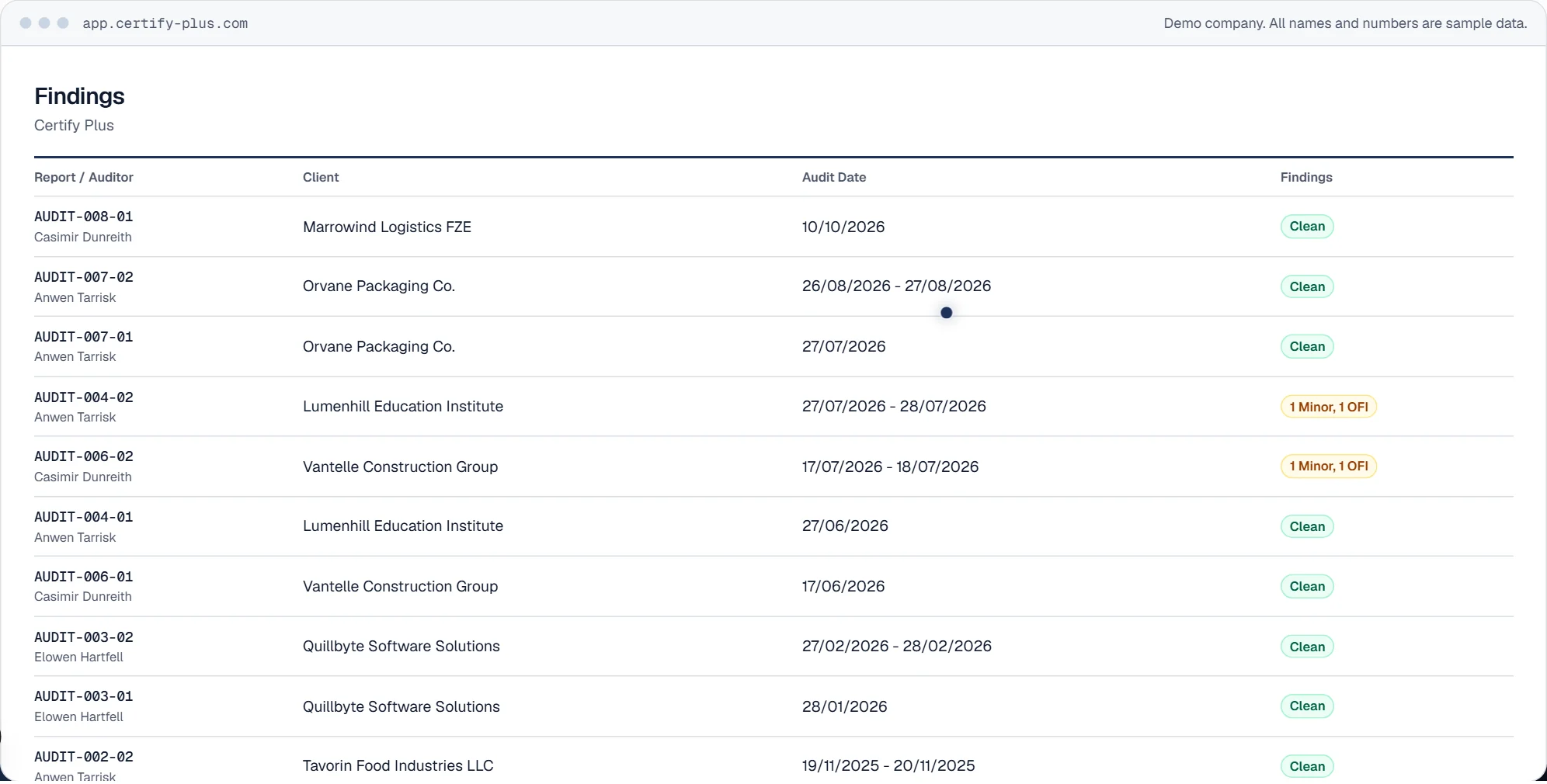
06FindingsFollow every finding through to an accepted corrective actionResolved findings go to Certificate Approval.

Every completed audit report fills this step. It follows the findings of the audit, and the client’s corrective actions, until the auditor accepts them.

app.certify-plus.com · demo company, sample data
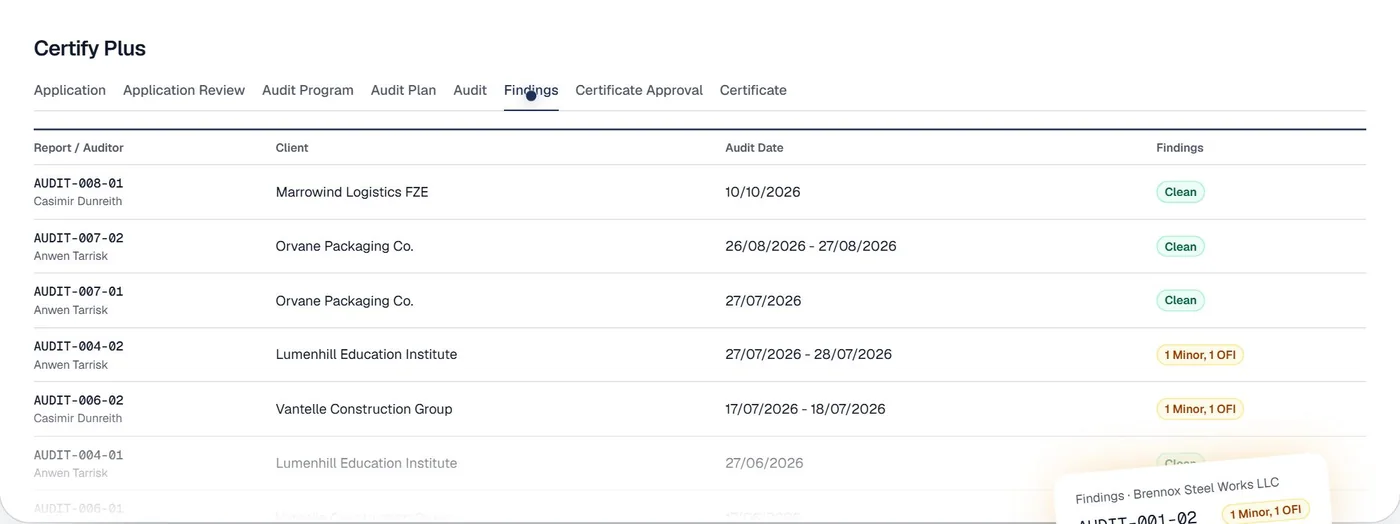
Findings in Certify Plus, with sample data

Who uses it: Auditors and certification coordinators.

What you see

  • Completed audit reports with the client, the audit date, the number of findings and the status: pending, awaiting auditor approval, corrective action rejected or converted.
  • A findings report for each audit, with the standard, clause, description and notes of every finding.

What you do

  • Email the findings to the client, from templates you can edit.
  • Upload the client’s completed corrective action (Word or PDF).
  • The auditor approves or rejects the corrective action, and can withdraw an approval.
  • Convert the audit to a Certificate Approval when the findings are resolved, and download the findings report as a PDF.

Rules built in

  • A corrective action counts only once the auditor has approved it.
07Certificate ApprovalThe certification decision, recorded and confirmed with the clientAn approved decision becomes a Certificate.

Before a certificate is issued, a person takes the certification decision, and the client confirms the details that will be printed on it.

app.certify-plus.com · demo company, sample data
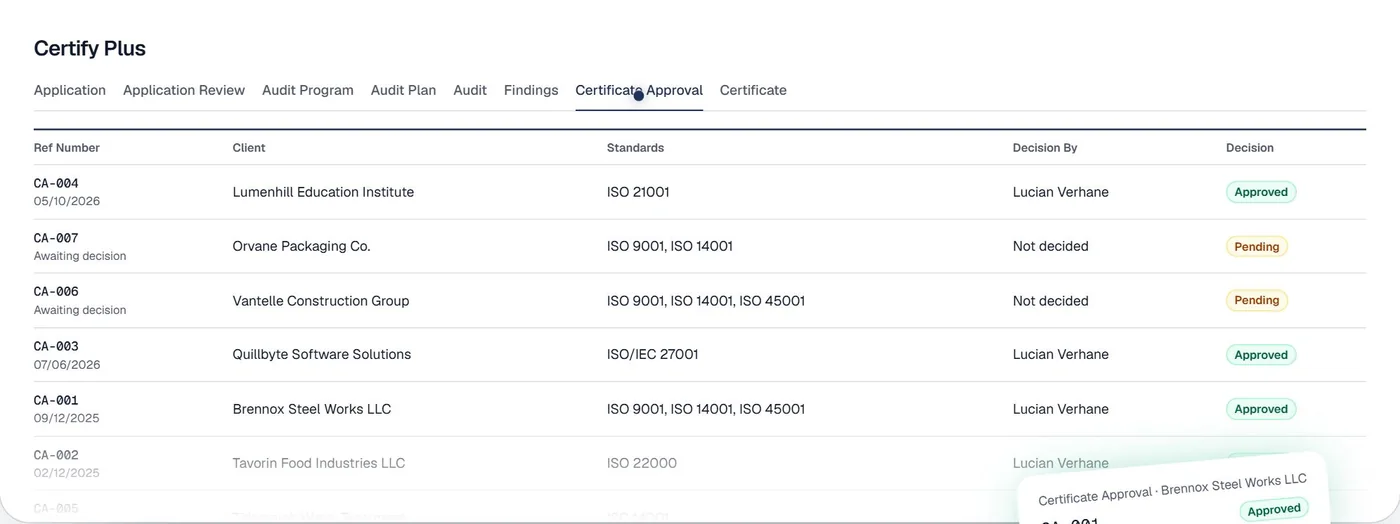
Certificate Approval in Certify Plus, with sample data

Who uses it: Decision makers and certification managers.

What the approval holds

  • The certificate details to confirm: number, organisation, scope, location, standard, issue date, validity and accreditation. For several locations, a schedule of each with its activities.
  • A mandatory verification checklist, with extra checks for a recertification.
  • A review of the findings: the nonconformities, whether they are closed and verified, and the lead auditor’s recommendation.
  • The decision: approved, changes required or rejected, with the decision maker, the date and comments.

What you do

  • Convert an audit, or its findings, into a certificate approval.
  • Email the client to confirm the certificate details. The client approves through a secure link, or signs and returns a confirmation form.
  • Follow each approval: pending, approved, client approved, changes required or rejected.
  • Convert an approved decision into a certificate.

Rules built in

  • The people allowed to take the decision are a list you manage in Settings.
08CertificateIssue the certificate under your own name, with a QR code and public verificationStays on record. Surveillance and recertification continue in the Audit Program.

The certificate itself, one for each standard, made from an approved decision. It carries your company name, logo and colour, or the accreditation you choose.

app.certify-plus.com · demo company, sample data
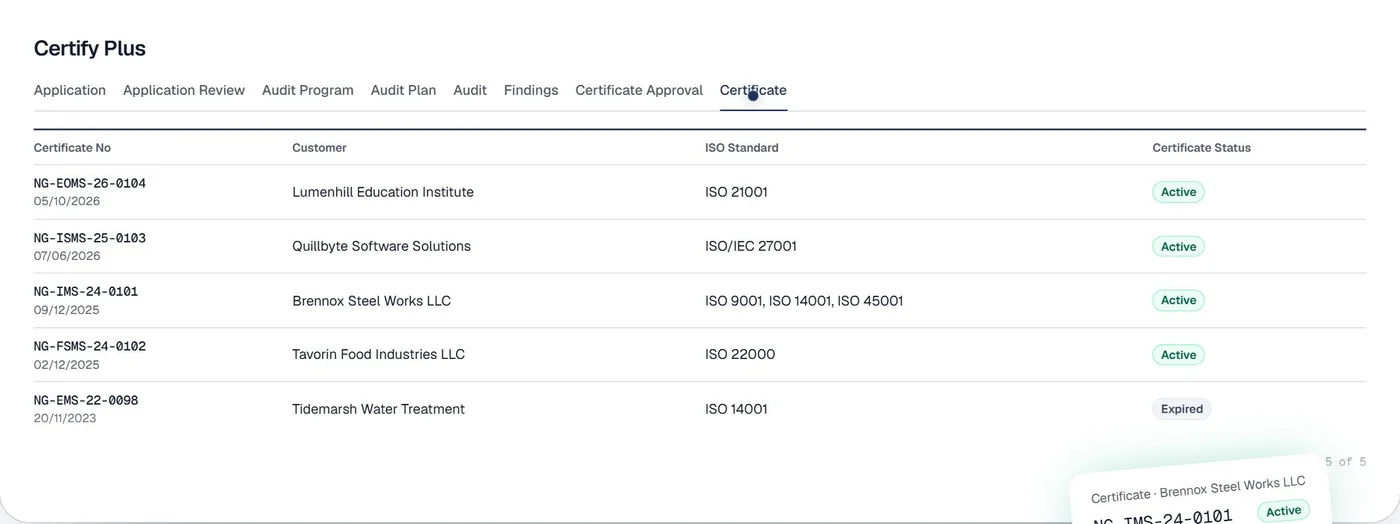
Certificate in Certify Plus, with sample data

Who uses it: Certification managers and administrators.

What a certificate holds

  • The number, status (issued, suspended, withdrawn or expired), and the registration, issue, yearly expiry and recertification dates.
  • The certified scope, and the location, or a schedule of several sites with their activities.
  • The accreditation body, if you use one.
  • A QR code and a link to your public verification page.

What you do

  • Issue the certificate from an approved decision, and renew it at recertification or when certification continues.
  • Preview it, download it as a PDF or an image, edit it, or email it to the client.
  • View certificates by client, in a table or as cards, and edit a whole group at once.
  • For certificates issued by a partner body, enter their certificate number and attach their file.
  • Suspend or withdraw a certificate by changing its status.

After it is issued

  • Public verification: anyone can enter a certificate number on your own verification page and see the company, standards, scope, locations, dates, the next audit and whether it is valid. Attempts are limited to prevent abuse.
  • Reminders: renewal, expired, suspended and withdrawn emails are prepared by the system. A person accepts or rejects each one before anything is sent.

Documents the process produces

Every one carries your company’s name, logo, colour and document numbers. None of them names Certify Plus.

  • Application
  • Application Review
  • Certification Agreement
  • Audit Program
  • Audit Plan
  • Audit report
  • Findings report
  • Certificate approval and details confirmation
  • Certificate (PDF or image)

What your company sets up

The process follows your own lists and wording.

Standards
Which ISO standards you offer. More than 40 are ready to use, and you can add your own.
Your lists
IAF codes, audit types, finding types, decision options, certificate statuses and application types.
Accreditation
Accreditation bodies and partner issuers.
People and money
Industry sectors, currencies and the people who take decisions.
Emails
The wording of every email of the process, from the application copy to the certificate.

Certify Plus is software, not an accreditation. Your clients’ certificates are as valid as the accreditation your certification body holds. Each step has its own permission, so people see only what their role allows, and an auditor can be limited to their own work.

The routine work runs on its own.

Your people make the decisions. Certify Plus does the rest.

  • Clients fill in their application from a linkDownload it as a PDF
  • Every audit plan is created from the programStage 1, Stage 2, surveillance and recertification
  • Reports go to a reviewer to approve or returnFindings come with the corrective-action form
  • Every certificate gets a public verification pageUnder your own name
  • Renewal, expiry, suspension and withdrawal reminders are prepared for youA person approves each one before it is sent

Built around ISO/IEC 17021-1 and the IAF mandatory documents

The requirements your accreditation body assesses you against, in the order your work follows.

IAF mandatory documents

  • IAF MD 1:2023

    Multi-site organisations

  • IAF MD 4:2023

    Use of ICT in auditing

  • IAF MD 5:2023

    Determination of audit time

  • IAF MD 11:2023

    Integrated management systems

Information security and auditor competence

ISO/IEC 27006-1:2024

Certification of information security management systems

  • ISO/IEC 17021-2:2016Environmental
  • ISO/IEC 17021-3:2017Quality
  • ISO/IEC TS 17021-10:2018Occupational health and safety

The foundation

ISO/IEC 17021-1:2015

Requirements for bodies providing audit and certification of management systems.

  1. Application
  2. Application Review
  3. Audit Program
  4. Audit Plan
  5. Audit
  6. Findings
  7. Certificate Approval
  8. Certificate

Certify Plus is software, not an accreditation. Your accreditation body assesses your certification body; Certify Plus keeps your work in the order these documents set out.

Certificates anyone can verify

Every certificate you issue can be verified on a public page under your own name.

app.certify-plus.com

ISO Certificates Dashboard

Live overview of issued certificates, expiry tracking, audit performance, and certification pipeline.

4

Active Certificates

1

Urgent

Expiring ≤ 30 Days

Urgent renewal

2

Expiring ≤ 90 Days

Plan recertification

2

Issued 2026

Year to date

0

Recertifications Due

Within 12 months

106d

Avg Time to Certify

App to Issued

4

Clients Certified

5 total certs

Certificates Issued, All Time

New certificates issued per year, broken down by standard

202320252026

ISO 21001 ISO/IEC 27001 ISO 9001 ISO 14001 ISO 45001

Standards Breakdown

  • ISO 21001

    1
  • ISO/IEC 27001

    1
  • ISO 9001

    1
  • ISO 14001

    1
  • ISO 45001

    1

Certificate Status

  • Active (Issued)

    4
  • Expired

    1
  • Suspended

    0
  • Withdrawn

    0
  • Total

    5

Expiry Timeline

Certificates due within 12 months, 4 shown

CompanyStandardsCert No.Expiry DateDays Left
Tavorin Food Industries LLCISO 22000NG-FSMS-24-010205/12/202629d
Brennox Steel Works LLCISO 9001, ISO 14001, ISO 45001NG-IMS-24-010108/12/202632d
Quillbyte Software SolutionsISO/IEC 27001NG-ISMS-25-010306/06/2027212d
Lumenhill Education InstituteISO 21001NG-EOMS-26-010404/10/2027332d

Auditor Workload

Number of audits conducted per auditor, 4 auditors

  • Anwen Tarrisk6

    Stage 1: 3, Stage 2: 3

  • Casimir Dunreith5

    Stage 1: 3, Stage 2: 2

  • Elowen Hartfell2

    Stage 1: 1, Stage 2: 1

  • Merrick Callowhill2

    Stage 1: 1, Stage 2: 1

Stage 1 Stage 2

Certification Pipeline

Active applications not yet converted to an issued certificate, 7 shown

CompanyApplication No.StandardsContactAppliedStage
Vantelle Construction GroupAPP-006ISO 9001, ISO 14001, ISO 45001Garrick Soldane28/05/2026161d agoIn Certification Flow
Orvane Packaging Co.APP-007ISO 9001, ISO 14001Tamsin Rovaldi07/07/2026121d agoIn Certification Flow
Marrowind Logistics FZEAPP-008ISO 9001, ISO 45001Fenwick Sarnell20/09/202646d agoIn Certification Flow
Corvani Energy ServicesAPP-009ISO 50001Ronan Ashgrove05/10/202631d agoIn Certification Flow
Sablewood Hospitality GroupAPP-010ISO 22000, ISO 9001Marisol Tennick15/10/202621d agoIn Certification Flow
Kelvane Facilities ManagementAPP-011ISO 41001Anselm Rothvik25/10/202611d agoIn Certification Flow
Nyxor Cybersecurity LabsAPP-012ISO/IEC 27001, ISO/IEC 27701Zilpha Quennell29/10/20267d agoIn Certification Flow

Beyond certification: the rest of your business

Clients and sales

  • Customers

    One record for every client: contacts, documents and certificates. In Package A, also their quotations, projects and history.

  • Leads

    Every enquiry followed from first contact to a won or lost deal.

  • Quotations

    Branded quotations and proposals, sent and followed up for you.

  • Invoices and receipts

    Proforma and tax invoices, payments and receipts under your own name.

Auditors and team

  • Auditors

    Every auditor’s profile, standards and IAF codes, qualifications, workload, performance and yearly assessment. Auditors complete their own profile through an onboarding link, and outside auditors see only the audits assigned to them.

  • Team Schedule

    Who is where, and when: audits, visits and leave on one shared calendar.

  • Projects and tasks

    Plan client projects in phases and keep the client informed, with to-dos, follow-ups and recurring reminders for the team.

  • Settings

    Make the system yours: company profile, offices, people, roles and rules. Show or hide form fields, add your own, and edit the wording of every email.

Operations and finance

  • Accounts

    Expenses with approval, payroll and payslips, budgets, VAT and a live profit and loss.

  • Operations and Sales

    Start every day knowing what needs your attention, and see your sales pipeline in numbers: leads, quotations and top clients.

  • KPI Dashboard and Reports

    Targets and performance scores for every person on the team, and sales, targets and accounting reports, ready to export.

Library and data

  • Templates

    Your own library of document templates, organised in folders.

  • Standards

    More than 40 standards are ready to use, and you can add your own. For example ISO 9001, ISO 14001, ISO 45001, ISO 22000, ISO 50001, ISO/IEC 27001, ISO 20000-1, ISO 22301, ISO 37001.

  • Import

    Bring your existing records in from Excel or CSV.

Your brand, your account, your data

Your name on everything

Your logo, your colours and your wording on documents and emails.

Try it free for 14 days

Use sample information while you try. No card needed.

Your data stays yours

Installed in your own database account. We have no access once the installation is finished.

Try either one free for 14 days.

No card needed.